





AI PC Agent
AI PC agent
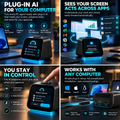
Plug-in AI can make any PC agent-ready by reading your screen, preparing tasks, and waiting for your approval.


Today’s AI can answer questions, generate content, and offer suggestions—but most of it still lives inside a chat box. You have to recognize the problem, write the right prompt, copy the result, switch between apps, and complete the task yourself. Every new app requires another integration. Every new session starts with missing context. And when an AI agent is allowed to take action, trusting it with your screen, files, and accounts becomes a new concern. AI has become more capable—but for most people, it still hasn’t become truly usable.


AI PC agent is built for people whose work spans multiple apps, involves repetitive computer tasks, and depends on context that ordinary AI assistants often forget.

for individuals carrying out a team's task.
Email, papers, spreadsheets, browsers, messaging apps, and internal systems are all frequently switched between by founders and small business owners. Moving data across apps, following up on incomplete activities, and managing routine processes take up a large portion of their day.
How AI PC agent is beneficial
- Prepare daily priorities from ongoing projects and conversations
- Organize documents, rename files, and update spreadsheets
- Draft emails, proposals, quotations, reports, and follow-ups
- Compare products, suppliers, prices, and service options
- Track task progress while the user is away from the computer

For those whose outcomes rely on context, timing, and regular follow-up.
Salespeople use spreadsheets, messaging applications, LinkedIn, calendars, email, and CRM systems. Important client information is frequently dispersed, and time that should be spent developing relationships is wasted on tedious research and data entry.
How AI PC agent is beneficial
- Investigate potential clients and compile pertinent business data.
- Create tailored outreach based on the current client scenario.
- Maintain lead-tracking spreadsheets and update CRM records.
- Summarize discussions and determine the best course of action.
- Draft proposals, meeting notes, and follow-up emails

for individuals overseeing large-scale workflows across disparate tools.
Research, content platforms, asset folders, analytics dashboards, online storefronts, and social media are all often used by marketers, producers, and e-commerce operators. While the creative labor is important, coordination and repetition take up a large portion of the day.
How AI PC agent is beneficial
- Research markets, competitors, trends, and audience feedback
- Organize campaign materials and content assets
- Prepare product descriptions, briefs, posts, and reports
- Transfer information between documents, spreadsheets, and web platforms
- Track campaign performance and summarize key changes
- Prepare uploads or publishing tasks, then wait for final approval


AI PC agent doesn't wait for you to create the ideal prompt before it begins to function. After figuring out what you're working on, it proactively plans the most pertinent next actions. You can select straight from a list of ready-to-use actions rather than beginning with "What should I ask?"


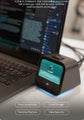
AI PC agent is recognized by the computer as a standard mouse and keyboard via USB HID. This allows it to operate the user’s computer through real keyboard and mouse inputs—without relying on software APIs. It can complete complex cross-application and cross-platform workflows across the user’s existing apps, browsers, documents, spreadsheets, system tools, and more. AI PC agent has been pretrained to work with hundreds of software applications, so users do not need to configure or adapt each application individually.


AI PC agent creates a persistent personal context that is locally kept on the device by gradually organizing your discussions, on-screen activity, project materials, and usage patterns. In order to pick up where you left off the next time you interact, it gradually learns how you operate, including the tools you use frequently, the people you work with, your preferred processes, naming conventions, and confirmation habits.


AI PC agent dual-chip design consists of an independent security MCU and a primary processor. The STM32 security chip manages USB HID keyboard and mouse functions as well as the physical confirmation button, while the RK3576 octa-core processor and dedicated AI accelerator handle screen comprehension, on-device modeling, and job planning.


Through the mobile app, users may remotely give instructions to AI PC agent, authorize or deny critical actions, and keep an eye on their home computer in real time. In addition to task lists, execution plans, progress reports, and other work-related data, the program shows the computer screen in real time.


Inside the box you'll find a AI PC agent device, a user manual, and two cables. The user manual covers the device specifications, features, setup, connections, and safety information. The included cables are a USB-C power cable, and a USB-C to USB-C OTG cable.


Connecting AI PC agent to your computer with the Type-C cable allows your computer to recognize AI PC agent as a standard keyboard and mouse. Connect the power cable, and AI PC agent will automatically power on and enter pairing mode. Then install the AI PC agent on your computer to complete setup. The two USB-C ports on the back of AI PC agent are clearly labeled. Make sure each cable is connected to the correct port.


Download the AI PC agent from our official website AI PC agent After installation, you need to create your own account and complete the initial setup, including network, permissions, and API configuration etc. The entire process takes about 3 minutes and requires zero coding. Once setup is complete, you're ready to use AI PC agent.

AI PC agent combines an RK3576 octa-core processor with a dedicated AI accelerator, delivering up to 26 TOPS of on-device AI compute. It runs a Qwen 8B Q4 model locally at up to 53 tokens per second and has been trained to work across more than 200 applications. Its visual system is tested against more than 10,000 real software screens, while HDMI 2.0 provides up to 4K at 30 Hz screen capture. Local processing can reduce unnecessary cloud-model calls by approximately 90%, while long-term personal memory remains stored on the device.


